History
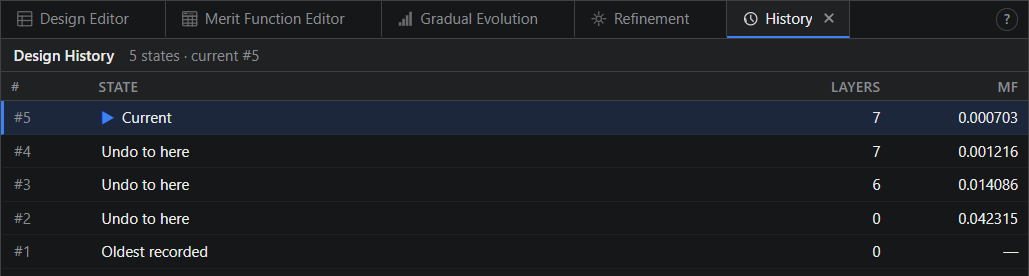
History lists every recorded state of the active design, newest first, and jumps the design to the row you click. It is the timeline that Ctrl+Z and Ctrl+Y (also F3 and Ctrl+F3) step through, so after a jump undo and redo carry on from the state you picked.
Computed quantities
Section titled “Computed quantities”| Column | Meaning |
|---|---|
| # | Position in the timeline, #1 the oldest. |
| State | Oldest recorded, Undo to here for an earlier state, Current, or Redo to here for a later one. |
| Layers | Front plus back layers in that state. |
| MF | The merit function the Merit Function Editor shows for that state; a dash when the state has no enabled rows. |
An MF dimmed and marked ≈ is read with every row at its default step, and the value at the rows’ own Steps replaces it once worked out. Under a cone angle the MF shows Computing cone response until it is worked out off the window’s thread. A red MF means a material of that state is missing. During an optimizer run no MF is worked out off the thread.
Controls and settings
Section titled “Controls and settings”Click a row to make it the current state. The header gives the number of states and the current position.
Timeline length and storage
Section titled “Timeline length and storage”- Up to 50 undo states and 50 redo states per design. Any committed edit after an undo drops the redo states.
- Refinement, Needle and Gradual Evolution record one state when they start and show their iterations as previews, so one Ctrl+Z takes back a whole run.
- A rename is not part of the timeline: undo keeps the current name.
- This copy of TFStudio keeps the timeline and any unsaved edits, so both are there the next time it opens; the design file holds only what you saved. If the file was saved from somewhere else in the meantime, such as another installed version, the saved file opens and your unsaved version becomes the last undo state.