Design Cleaner
Design Cleaner tidies what synthesis leaves behind: neighbouring layers of one material, and layers too thin for a coater to make. It merges the neighbours, removes the thin layers and repeats until the design is stable, since a removed middle layer can leave two layers of one material touching. It can then refine the result to win back merit the change cost.
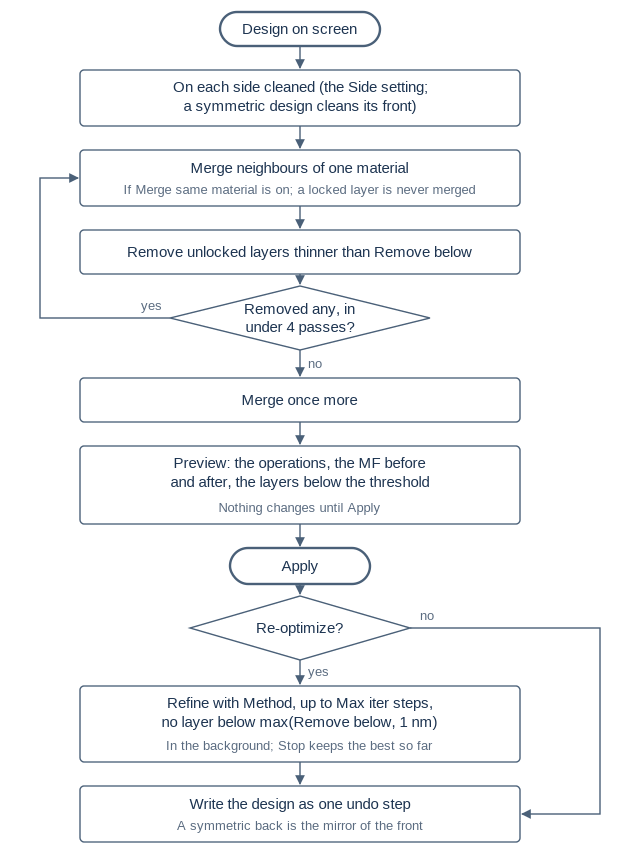
Locked layers are never merged, removed or given thickness, and a symmetric design gets the cleaned front mirrored onto its back.
Computed quantities
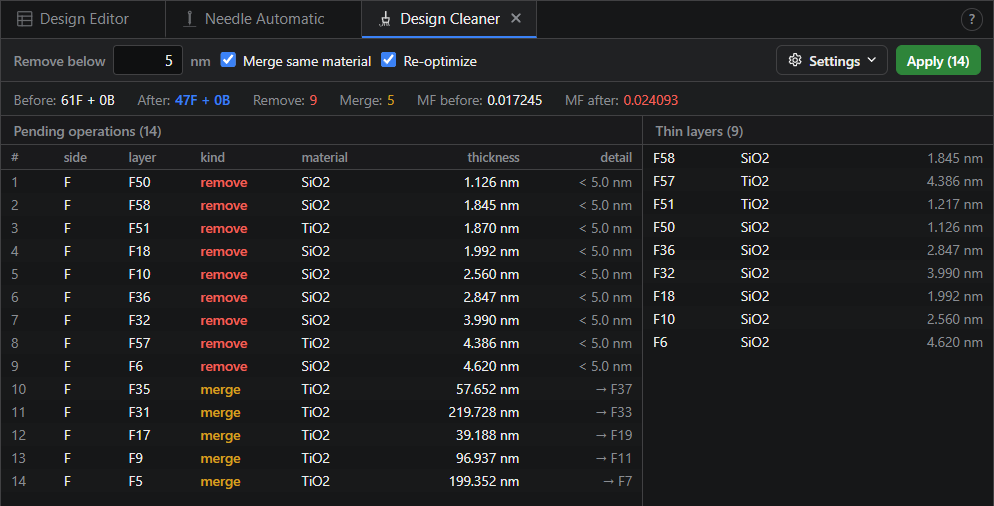
Section titled “Computed quantities”- Pending operations: each layer that will be removed or merged into its neighbour, in the order they run. The thickness shown is the layer’s when its turn comes, so a layer that took a removed neighbour’s thickness shows more here than in Thin layers.
- Before and After: the layer counts.
- MF before and MF after: the merit function of the Merit Function Editor; MF after is the cleaned design before any refinement.
- Thin layers: the layers below the threshold now.
Controls and settings
Section titled “Controls and settings”Side: on a design coated on both sides, which side is cleaned. Front or Back leaves the other side exactly as it is, Both (the default) cleans both. A design coated on one side, or a symmetric one, has no Side choice.
Remove below: layers thinner than this many nanometres are removed, each handing its optical thickness to a neighbour. 5 nm by default; raise it to your manufacturing minimum for the final pass.
Merge same material: combine neighbouring layers of one material into one. On by default.
Re-optimize: refine the cleaned design before Apply writes it. On by default.
Method and Max iter, in the Settings menu beside Apply: the refiner, Sequential QP by default, or Damped Least Squares, Conjugate Gradient, Newton or Newton-CG, for 1 to 500 steps (80 by default).
Apply and Stop: Apply writes the cleanup and the refinement as one undoable step. The refinement runs in the background, the strip under the controls shows its step and merit, and Stop applies the cleanup with the best thicknesses found so far. Switching to another design while it runs applies nothing.
How it is computed
Section titled “How it is computed”Merging
Section titled “Merging”Merging changes nothing optically. Two neighbouring layers of one material share the admittance and their phase thicknesses add, so their matrices (see Needle) multiply to the matrix of one layer of the summed thickness:
R, T and the MF are therefore the same before and after a merge. Only removals move MF after.
Removing and re-optimizing
Section titled “Removing and re-optimizing”The refinement uses every row of the merit function, its band rows sampled as a Refinement run samples them at launch, and no layer may go below the larger of the threshold and 1 nm, so a layer the cleaner kept cannot be refined back under it.
Tikhonravov et al. take a thin layer out by giving it the index of a neighbour, which keeps the total optical thickness, and Design Cleaner does the same. Here is the real part of the index at the design’s reference wavelength: the removed layer’s optical thickness goes to the unlocked neighbour whose index is closer, which grows by . Only a layer with hands its thickness over, and only to a neighbour with : for a metal is not the phase thickness. A metal layer, and a layer with no such unlocked neighbour, is taken out alone. Their design cleaning takes out one layer at a time, the one whose removal raises the merit least, until an allowed rise is used. Design Cleaner removes every layer under the threshold, the thinnest first, without looking at the merit, and the refinement after it recovers what the merit wants. Gradual Evolution’s Consolidate on finish is the one-layer-at-a-time removal judged by the merit.
References
Section titled “References”- H. A. Macleod, Thin-Film Optical Filters, 5th ed., Eq. 2.111 (layer matrix) and Chapter 3 (thin layers left by automatic design).
- A. V. Tikhonravov, M. K. Trubetskov and G. W. DeBell, Appl. Opt. 46, 704 (2007): thin-layer removal and design cleaning.
- B. T. Sullivan and J. A. Dobrowolski, Appl. Opt. 35, 5484 (1996): removing layers below a minimum thickness after refinement.