Refinement
Refinement moves the layer thicknesses to lower the merit function, with the method you pick. It never adds or removes layers. The layers that move are those of the surface mode set in the Design Editor, shown by the Optimize and Eval badges; locked layers stay put. How each method takes its steps, with a figure of each, is on Optimization Methods.
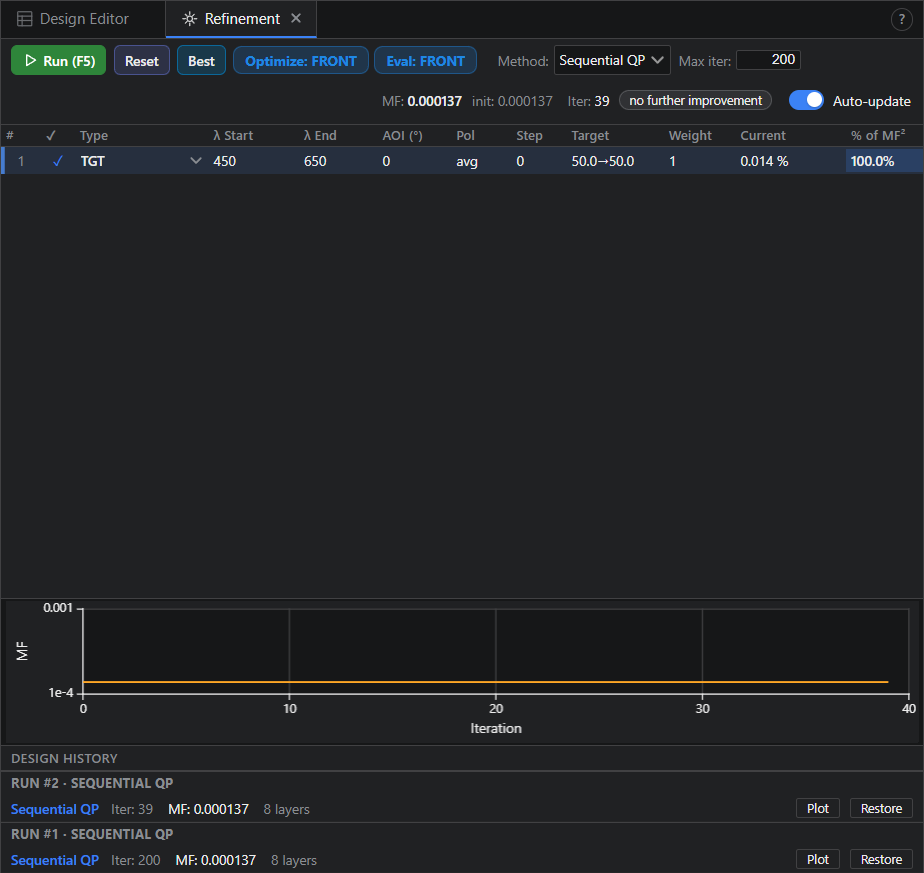
Computed quantities
Section titled “Computed quantities”- MF: the merit function of the design on screen; best, the lowest of the run so far; init, the merit the run started from. The MF trend strip plots the best merit against iteration on a log axis.
- Iter: the iterations of the run; with Try all, added up over its methods.
- The pill at the end of a run: target reached, max iter, no further improvement, or after Try all best: and the method that did best. DLS multi-start ends without one.
Controls and settings
Section titled “Controls and settings”Run (F5) and Stop. Best puts the run’s lowest-merit design on, also after Stop. Reset returns to the thicknesses from before the run, and a single undo covers the whole run.
Method: SQP (the default), Damped Least Squares, Conjugate Gradient, Newton, Newton-CG, Trust-region Newton, DLS multi-start, Differential Evolution, Simulated Annealing, or Try all, keep best. Your choice is remembered across designs.
Max iter: the most iterations a one-method run takes; it starts at the method’s own budget and the run still stops early on the method’s own test. Try all hides it and gives each method its own budget.
Restarts and Perturb ±%: for DLS multi-start and Try all, the number of perturbed starts and how far each thickness is scattered, 20 and 30 % by default.
Seed: for Differential Evolution, Simulated Annealing, DLS multi-start and Try all. Left empty, Run draws a seed and leaves it in the field, so the same seed, design and settings give the same run again; clear the field to draw afresh.
Auto-update: on, the other open windows follow the design while the run goes; off, they hold the design the run started from and update when it stops.
Design History: one row per method a run finished, under a heading for each Run press, newest first, and best first within a press. A stochastic method’s row shows its seed. Plot shows the row’s MF trend and Restore puts its thicknesses on the design.
The table in the middle is the merit function, the same rows as the Merit Function Editor, and can be edited here. Each design keeps its own last run: switching designs shows that design’s readout and trend, and Best applies that design’s result.
How a run works
Section titled “How a run works”When Run is pressed, each band row gets the number of sample wavelengths the design’s fringe spacing needs, and more where the band hides a narrow feature (see Operand Reference). A run does not start when no row is enabled or a row cannot be evaluated. It then minimizes:
Try all runs CG, DLS, Newton, Newton-CG, SQP, Trust-region Newton, DE, SA and DLS multi-start one after another, each from the same start and not from the one before, and keeps the lowest MF. DLS multi-start runs several restarts at once, one per thread the app uses; Differential Evolution scores each generation on several threads when four or more layers are free. Neither changes the result.
Needle Automatic leaves the MNT and MXT rows out, so run Refinement after it to bring them back.
References
Section titled “References”- H. A. Macleod, Thin-Film Optical Filters, 5th ed., Section 3.6, pp. 88-97: refinement and synthesis.
- J. Nocedal and S. J. Wright, Numerical Optimization, 2nd ed.